



Description
Download WhatSender - Free Bulk WhatsApp Sender
Overview
WhatSender - Free Bulk WhatsApp Sender is a productivity-focused tool designed to streamline communication for businesses using WhatsApp as a marketing and outreach channel. The application enables users to send bulk messages, automate outreach, and manage customer engagement efficiently. Its primary purpose is to reduce manual effort in messaging campaigns while improving reach and consistency. This makes it particularly valuable for small to medium-sized enterprises, event organizers, and marketing teams aiming to scale their WhatsApp-based communication.
The tool operates on a Windows platform, meaning it is not a mobile application but rather a desktop utility. This distinction is important, as users must run the software on a Windows machine to access its features. Despite its desktop nature, it serves as a critical bridge between businesses and their WhatsApp contacts, allowing for rapid dissemination of promotional content, event reminders, and service updates.
Real-world use cases include sending event invitations to hundreds of attendees, distributing product launch announcements, or following up with customers after a purchase. The software’s automation and scheduling capabilities support time-sensitive campaigns, ensuring messages are delivered at optimal moments. While the developer, WhatSender, has not disclosed further background details, the app’s focus on WhatsApp marketing aligns with growing demand for efficient, scalable communication tools in the digital business landscape.
Although not a mobile app, WhatSender fills a niche in the productivity ecosystem by offering a free, accessible solution for businesses seeking to leverage WhatsApp without the limitations of manual messaging.
Key Features & Functionality
WhatSender delivers a suite of tools tailored for businesses that rely on WhatsApp for customer communication. The core functionality centers on efficiency, automation, and personalization, all of which are essential for modern marketing strategies.
- Bulk Messaging: Users can send messages to multiple contacts simultaneously, eliminating the need to manually message each recipient. This is ideal for sending announcements to large audiences, such as notifying customers about a flash sale or sharing event details.
- Automated Messaging: The platform allows users to schedule messages to be sent at specific times. This ensures timely delivery during peak engagement hours without requiring constant supervision.
- Personalized Templates: Customizable message templates can be created and tailored with recipient-specific details like names or event dates. This enhances message relevance and increases the likelihood of response.
- API Integration: The software supports integration with external systems, enabling data synchronization between CRM platforms, databases, or marketing tools. This streamlines workflows and reduces manual data entry.
- Advanced Reporting: Built-in analytics provide insights into message delivery rates, open times, and user interactions. These metrics help businesses refine their messaging strategies and improve campaign performance over time.
These features collectively support a scalable communication strategy. For instance, a business can use the tool to send personalized birthday offers to 500 customers on a single day, scheduled in advance. The reporting function then helps assess which message variations performed best, informing future campaigns.
Interface, UX & Performance
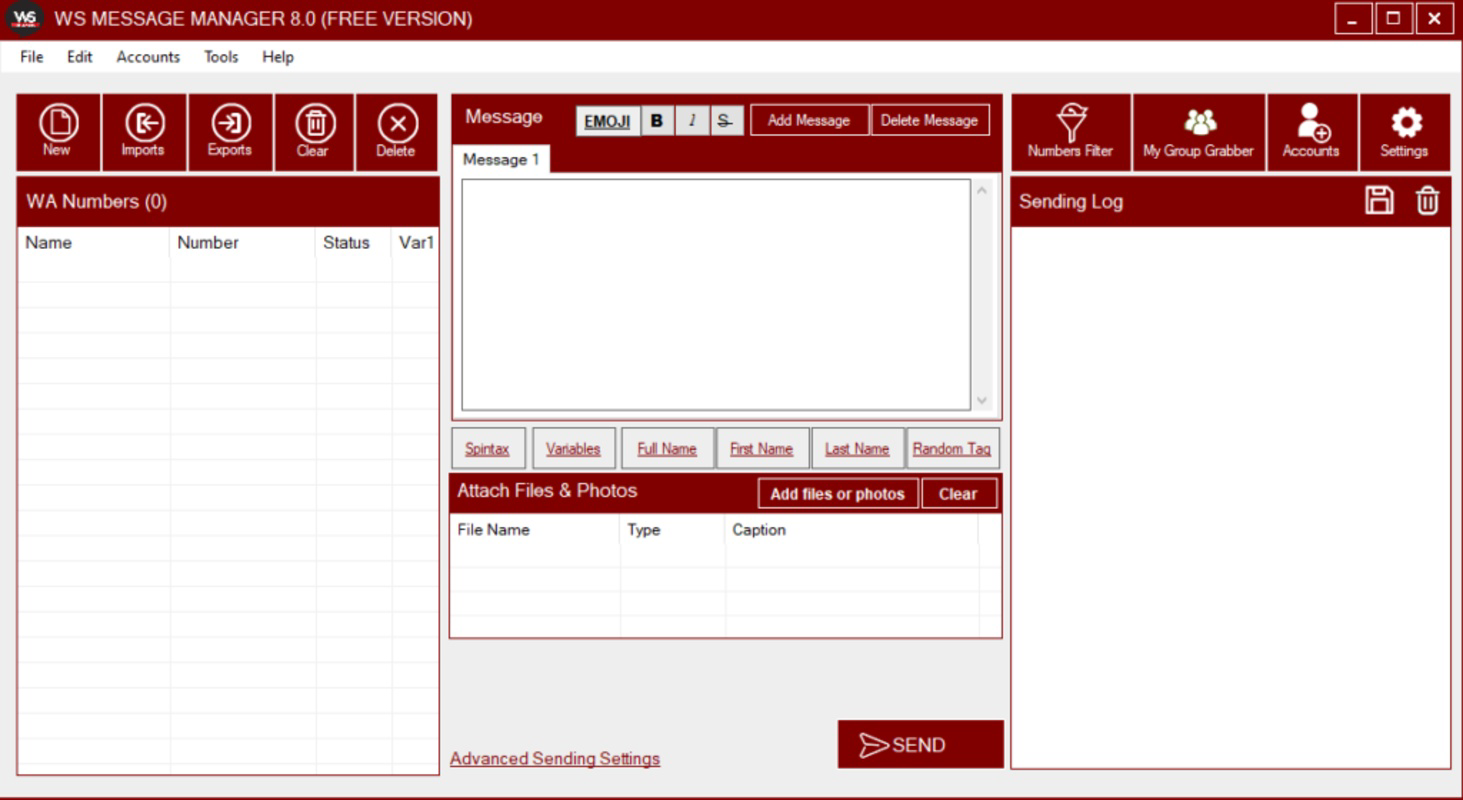
WhatSender presents a clean, task-oriented interface designed for ease of use, particularly for users familiar with desktop software. The layout prioritizes functionality, with clearly labeled sections for message composition, contact management, scheduling, and reporting. Navigation is straightforward, relying on a menu-driven system that minimizes user confusion.
The visual style is minimalistic, focusing on usability rather than decorative elements. This approach ensures that users can concentrate on their messaging tasks without distraction. Input fields, buttons, and dropdown menus are logically arranged, contributing to a smooth workflow.
Although the developer did not list formal performance metrics, the application’s lightweight nature—24.5 MB in size—suggests it runs efficiently on standard Windows systems. It is expected to operate smoothly on mid-range desktops and laptops without significant resource consumption. Responsiveness is likely consistent, especially during bulk operations, though real-world testing would be required to confirm stability under heavy load.
Users should expect stable performance during regular use, but the lack of mobile compatibility means the app cannot be used on smartphones or tablets. This limits accessibility for users who prefer on-the-go management. Overall, the UX is designed with business efficiency in mind, though advanced users may seek additional customization options.
Platform Compatibility & Technical Requirements
WhatSender - Free Bulk WhatsApp Sender is designed exclusively for the Windows operating system. It is compatible with Windows-based desktops and laptops, making it accessible to users running Windows 7 or later, though specific minimum OS requirements were not listed by the developer.
The software has a file size of 24.5 MB, indicating a lightweight installation that does not impose significant storage demands. This makes it suitable for use on systems with limited disk space. The app is available at no cost, with a current version of 2.1.0 as of the release date on 2025-04-16.
Since the tool is not a mobile application, it cannot be installed on Android or iOS devices. Users must rely on a Windows machine to access all features. The developer did not specify compatibility with 32-bit or 64-bit systems, nor did they provide details about required hardware specifications.
For users without a Windows device, alternative solutions may be necessary. However, for those with access to a Windows PC, the app offers a direct, downloadable tool for WhatsApp-based outreach without relying on third-party services or browser-based workarounds.
Pros and Cons
Pros
- Free to download and use, offering cost-effective access to bulk messaging.
- Supports automated scheduling, reducing manual effort in campaign management.
- Provides customizable message templates for personalized outreach.
- Includes advanced reporting features to track campaign performance.
- Lightweight design with a small file size of 24.5 MB.
Cons
- Available only on Windows, limiting access for mobile users.
- Not a mobile app, so cannot be used on smartphones or tablets.
- Specific system requirements were not disclosed by the developer.
- Limited to desktop use, which may hinder on-the-go accessibility.
- API integration may require technical knowledge to implement effectively.
FAQ
Is WhatSender safe to use?
Yes, the app is designed to operate securely within the constraints of the Windows platform. However, users should ensure they are downloading the software from the official source to avoid potential security risks.
Can I use WhatSender on my Android or iOS device?
No, WhatSender is a Windows-based application and is not available for Android or iOS. It must be installed on a Windows PC to function.
Does WhatSender require a WhatsApp Business account?
The app does not explicitly require a WhatsApp Business account, but using a Business account may enhance message delivery and provide access to additional features through WhatsApp’s official API.
How often can I update WhatSender?
Updates are released by the developer as needed. The current version is 2.1.0, and users should check the official website for the latest release and security patches.
Is the app secure for sending bulk messages?
While the app itself does not store user data, users should follow best practices for data privacy. Messages are sent through the user’s personal WhatsApp account, so maintaining account security is essential.
Final Thoughts
WhatSender - Free Bulk WhatsApp Sender stands out as a practical, no-cost solution for businesses aiming to scale their WhatsApp communication. Its combination of bulk messaging, automation, and reporting features makes it a valuable tool for marketing teams, event organizers, and small businesses. While it is limited to Windows devices, its lightweight design and free access make it accessible to a wide audience.
For users who rely on WhatsApp for outreach and need to manage large contact lists efficiently, this tool offers a streamlined workflow without the overhead of complex software. The ability to personalize messages and track campaign success adds significant value, enhancing both engagement and ROI.
Despite its desktop-only nature, WhatSender delivers strong functionality for its intended use case. If you're looking for a secure, free, and effective way to send bulk WhatsApp messages from your computer, this tool is worth exploring.
Download WhatSender now
Guides & Tutorials for WhatSender - Free Bulk WhatsApp Sender
How to install WhatSender - Free Bulk WhatsApp Sender
- Click the Preview / Download button above.
- Once redirected, accept the terms and click Install.
- Wait for the WhatSender - Free Bulk WhatsApp Sender download to finish on your device.
How to use WhatSender - Free Bulk WhatsApp Sender
This software is primarily used for its core features described above. Open the app after installation to explore its capabilities.
User Reviews for WhatSender - Free Bulk WhatsApp Sender 0
No reviews found


